# Best Markdown Editors & Readers in 2026: 8 Apps Compared
> A neutral, evidence-based comparison of eight paid and open-source Markdown editors, with hands-on notes, Reddit feedback, screenshots, and clear recommendations by workflow.
**The best Markdown editor is not the one with the longest feature list. It is the one that creates the least friction between you and the file.**
**Read this guide in:** [English](/tools/markdown-editors/) · [日本語](/ja/tools/markdown-editors/) · [한국어](/ko/tools/markdown-editors/) · [简体中文](/zh-cn/tools/markdown-editors/) · [繁體中文](/zh-tw/tools/markdown-editors/) · [Español](/es/tools/markdown-editors/) · [Português](/pt/tools/markdown-editors/)
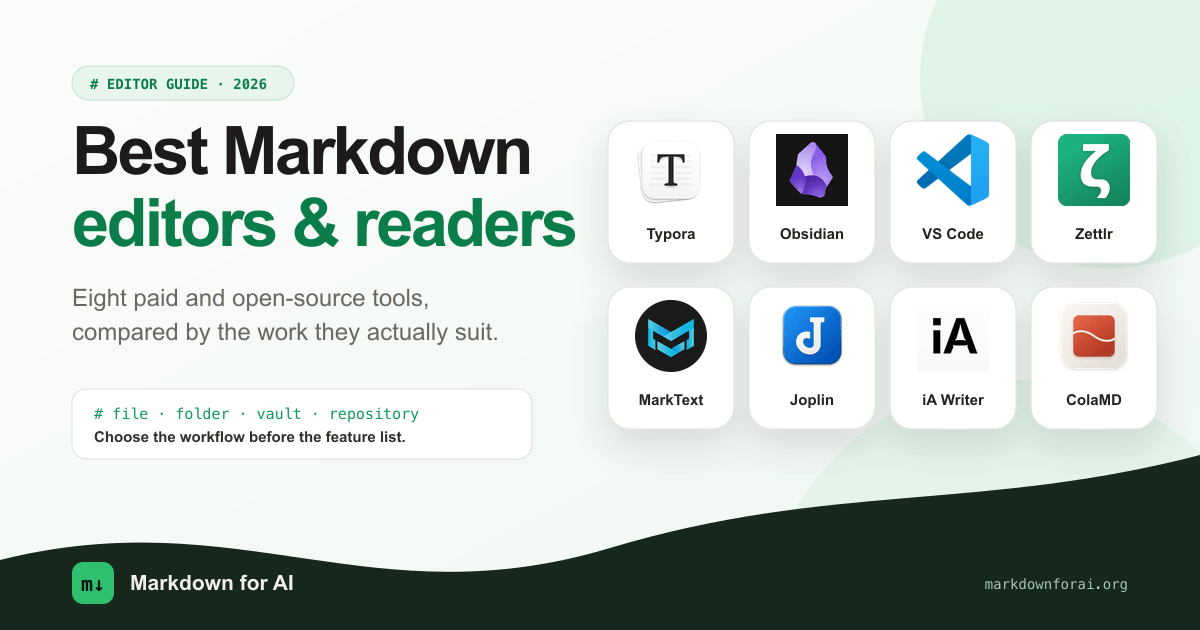
*Product marks belong to their respective owners. Cover composition by Markdown for AI.*
That sounds obvious, but most comparisons ignore it. Opening a generated `plan.md`, maintaining a decade of linked notes, writing a paper with citations, and editing documentation beside code are four different jobs. A tool can be excellent at one and irritating at another.
We compared eight established and emerging apps with that distinction in mind. Four of them—Typora, Obsidian, MarkText, and ColaMD—also include notes from our editor's own use. Product details, prices, release status, and download sizes were checked against official sources on **August 11, 2026**. Reddit discussions are used to show recurring benefits and complaints, not as proof that every user will have the same experience.
No company paid for inclusion, supplied a review copy, or received an affiliate link.
:::note[Our recommendations]
- **Best paid editor for ordinary Markdown documents:** Typora
- **Best for a personal knowledge base:** Obsidian
- **Best when Markdown lives in a code repository:** Visual Studio Code
- **Best for academic and citation-heavy writing:** Zettlr
- **Best open-source Typora alternative:** MarkText, if you accept its stale stable release
- **Best open-source notebook across devices:** Joplin
- **Best focused writing app for Apple users:** iA Writer
- **Most interesting newcomer for AI-edited local files:** ColaMD, but not yet our default recommendation
:::
## The real choice: file, folder, vault, or repository?
Before comparing features, decide what you expect to open.
- A **file editor** should open any `.md` file immediately and leave it where it is.
- A **folder editor** should expose a file tree and let you move through a writing project without importing it.
- A **knowledge system** should make links, search, metadata, and long-term organization worth the commitment it asks from you.
- A **developer workspace** should keep Markdown close to code, Git, terminals, and coding agents.
The boundaries are not absolute, but they explain most bad recommendations. Obsidian is much more capable than a small Markdown reader, yet its vault model is unnecessary ceremony when you only want to inspect one loose file. VS Code is excellent for repository documentation, but it remains an IDE-shaped answer to a reading problem. ColaMD concentrates on files changed by external tools, but that focus also means giving up the navigation and extension systems found elsewhere.
Our rule is simple: **choose the smallest workflow that covers your recurring work. Pay when a commercial app removes friction you actually encounter—not because its feature grid is longer.**
## Markdown editor comparison
| Product | Price / license | Platforms | Best for | The reason not to choose it |
|---|---|---|---|---|
|  Typora | $14.99 one-time, proprietary | macOS, Windows, Linux | Polished document editing and export | No mobile app or knowledge system |
|
Typora | $14.99 one-time, proprietary | macOS, Windows, Linux | Polished document editing and export | No mobile app or knowledge system |
|  Obsidian | Free app, proprietary; paid services optional | Desktop and mobile | Linked notes and personal knowledge bases | A loose file still has to fit the vault model |
|
Obsidian | Free app, proprietary; paid services optional | Desktop and mobile | Linked notes and personal knowledge bases | A loose file still has to fit the vault model |
|  VS Code | Free; Microsoft build is proprietary | macOS, Windows, Linux, Web | Technical users working on repository docs | Source editing takes priority over reading and preview |
|
VS Code | Free; Microsoft build is proprietary | macOS, Windows, Linux, Web | Technical users working on repository docs | Source editing takes priority over reading and preview |
|  Zettlr | Free, GPL-3.0 | macOS, Windows, Linux | Research, citations, and multi-file writing | Denser interface and a steeper learning curve |
|
Zettlr | Free, GPL-3.0 | macOS, Windows, Linux | Research, citations, and multi-file writing | Denser interface and a steeper learning curve |
|  MarkText | Free, MIT | macOS, Windows, Linux | Open-source, Typora-like editing | Current source work has not yet produced a new stable release |
|
MarkText | Free, MIT | macOS, Windows, Linux | Open-source, Typora-like editing | Current source work has not yet produced a new stable release |
|  Joplin | Free, open source; paid sync optional | Desktop and mobile | Cross-device notebooks and flexible sync | It manages notes rather than arbitrary files |
|
Joplin | Free, open source; paid sync optional | Desktop and mobile | Cross-device notebooks and flexible sync | It manages notes rather than arbitrary files |
|  iA Writer | Paid per platform, proprietary | macOS, Windows, iPhone, iPad | Focused prose and mobile writing | Buying it on several platforms is expensive |
|
iA Writer | Paid per platform, proprietary | macOS, Windows, iPhone, iPad | Focused prose and mobile writing | Buying it on several platforms is expensive |
|  ColaMD | Free, MIT | macOS, Windows, Linux | Local files changed by external AI agents | Young project; no workspace tree, plugins, or visible document outline |
:::caution[Free does not mean open source]
Obsidian is free to use and stores local Markdown files, but the application is proprietary. Microsoft's VS Code download also uses Microsoft's product license, although the upstream Code - OSS repository is MIT-licensed. If auditability or redistribution matters, check the application license rather than its price.
:::
## Typora
**Our recommendation: the best paid Markdown editor for people who want a document, not a system.**
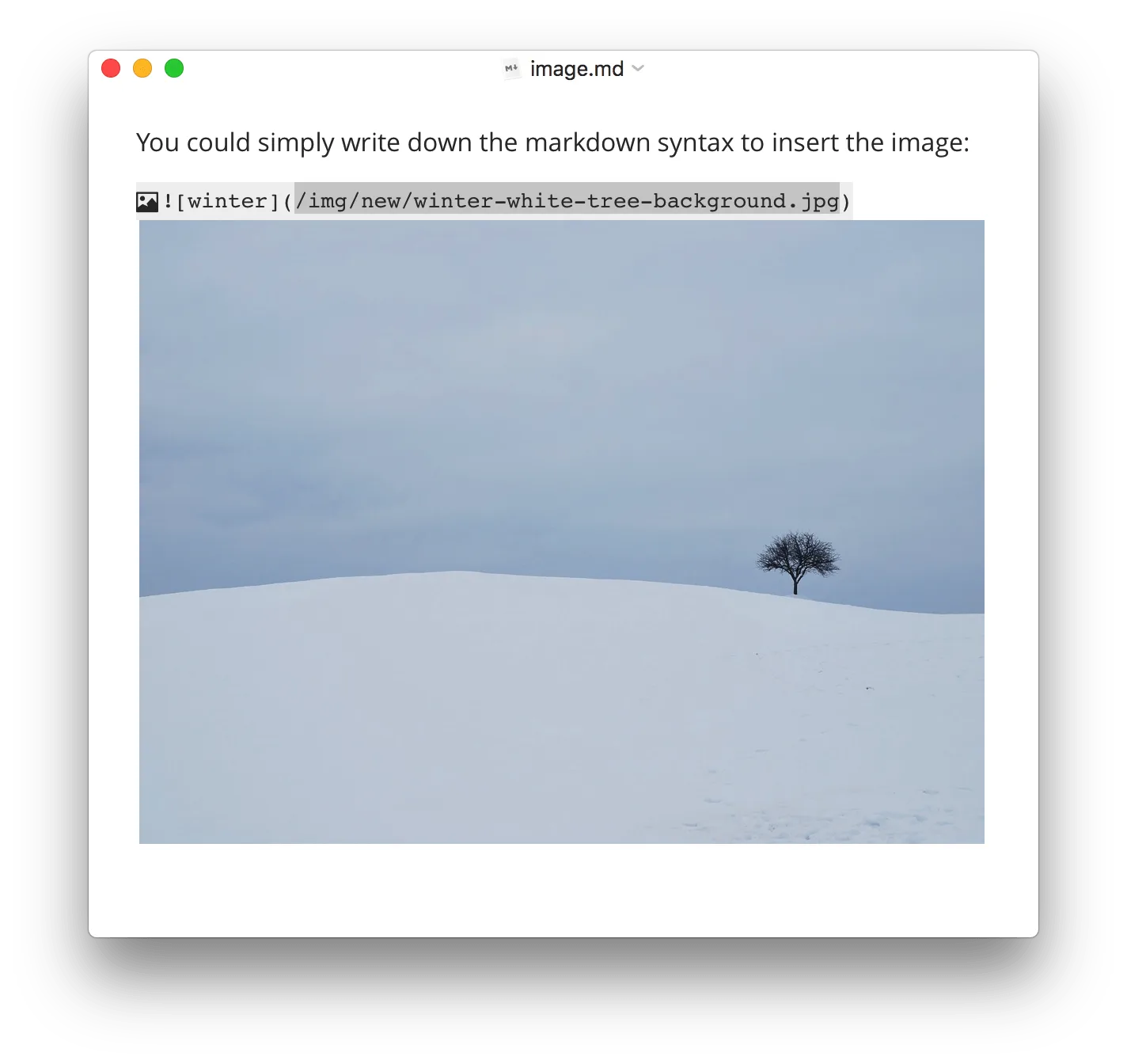
*Official product screenshot. Source: [Typora](https://typora.io/).*
Typora's enduring advantage is not a rare feature. It is that the editor feels unusually coherent. Instead of keeping Markdown source on the left and a rendered preview on the right, it formats the document in place. Tables, math, diagrams, file navigation, an outline, custom CSS themes, focus mode, and export are present without making the page feel like a control panel.
Typora became a paid product with the [1.0 release on November 23, 2021](https://support.typora.io/What%27s-New-1.0/). That was almost five years ago at the time of this review, so describing the change as recent is no longer accurate. The official price is currently **$14.99 before tax**, covering up to three devices, with a 15-day evaluation period.
:::note[Editor's field note]
Typora was my regular Markdown editor for years, largely because its typography and editing rhythm were better than the alternatives. When an evaluation expires it asks for a license, but in my experience the prompt has not prevented me from viewing a document. I still think it is worth paying for if that polish matters to you; the price is modest for software used every day.
:::
Reddit discussions still treat Typora as the benchmark to match. Users repeatedly return to its writing feel, inline rendering, and PDF export. The recurring criticism is equally specific: Markdown syntax reappears around the cursor and can move the text slightly while editing, so this is not identical to a Word-style rich-text editor. Others leave because they need tabs, mobile access, extensibility, or a knowledge base. See the [Typora alternatives discussion](https://www.reddit.com/r/Markdown/comments/1t4wvn8/which_markdown_editor_is_better_or_an_equal_to/) and [WYSIWYG discussion](https://www.reddit.com/r/Markdown/comments/1v0qd3b/so_there_is_no_true_wysiwyg_markdown_editor_they/).
**Pros**
- The most refined inline Markdown editing in this group.
- Opens ordinary files and folders without converting them into a library.
- Strong tables, math, diagrams, outline navigation, themes, and export.
- A low one-time price rather than another subscription.
**Cons**
- Proprietary and paid.
- No mobile version, backlink system, or plugin ecosystem comparable to Obsidian.
- Inline syntax still appears at the cursor, which some writers find visually disruptive.
**Bottom line:** buy Typora if most of your work begins with “open this document and write.” It is our safest general recommendation, but not the right architecture for a second brain or a code repository.
## Obsidian
**Our recommendation: the best Markdown knowledge system, but an unnecessarily heavy way to open one file.**
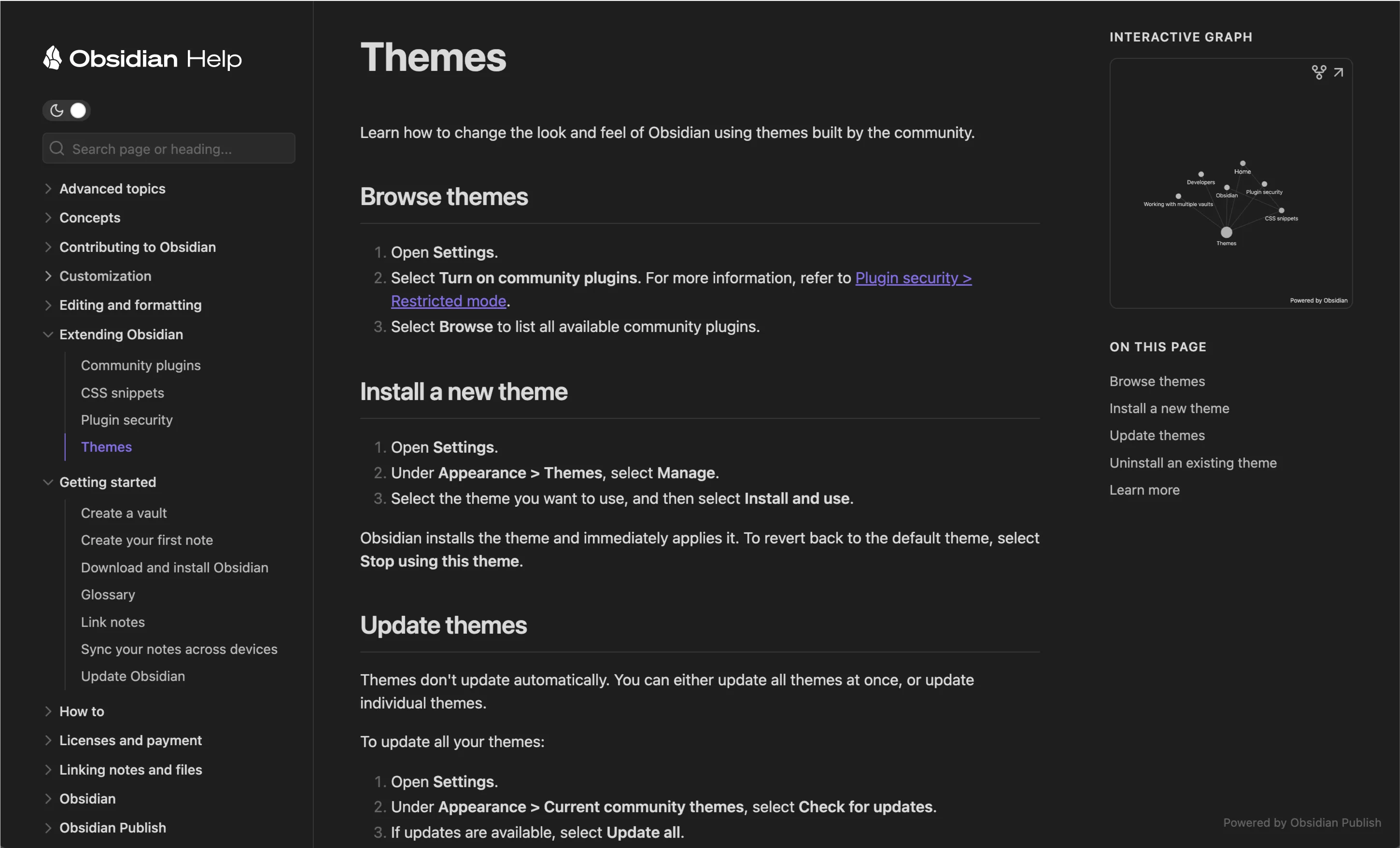
*Official screenshot of the Obsidian ecosystem. Source: [Obsidian](https://obsidian.md/).*
Obsidian is one of the most established products in this comparison's knowledge-base category. It stores notes locally as Markdown, then builds backlinks, graph views, Canvas, properties, search, themes, and a large plugin ecosystem around them. The core app is free and works on desktop and mobile; Sync and Publish are optional paid services.
The crucial word is **vault**. An Obsidian vault is simply a folder of notes, which is much more portable than a proprietary cloud database. But it is still the unit around which the product is designed. That is an advantage when the folder represents an evolving body of knowledge and a minor obstacle when somebody sends you one Markdown file in Downloads.
:::note[Editor's field note]
Obsidian is powerful, mature, and unusually extensible. I like it when I am working inside a vault. But sometimes I only want to open a `.md` file, read it, and close it. In that moment the vault concept makes an otherwise excellent app feel heavier than the job.
:::
The same tension appears in user reports. An r/ObsidianMD discussion praises Obsidian as an editor and viewer while objecting to moving a standalone file into a vault. Writers also describe the plugin system as both its strength and a source of distraction: the app can become a hobby to configure rather than a place to write. See the [standalone-file discussion](https://www.reddit.com/r/ObsidianMD/comments/1uiyv7x/using_obsidian_as_a_standalone_markdown/) and [writer recommendations](https://www.reddit.com/r/Markdown/comments/1tn6yhu/editor_recommend_for_writer/).
**Pros**
- Excellent links, search, graph, themes, and community plugins.
- Local Markdown files make the content more portable than a closed notebook database.
- Serious desktop and mobile applications.
- Can grow from plain notes into a highly customized research or knowledge environment.
**Cons**
- The vault model adds friction to isolated files.
- Plugins and themes invite endless configuration and occasional compatibility problems.
- The application is proprietary; official synchronization and publishing cost extra.
**Bottom line:** choose Obsidian when the folder matters more than the individual file. If you regularly follow links between notes and expect the collection to live for years, its extra structure earns its keep. For a generated `plan.md` you may read once, it does not.
## Visual Studio Code
**Our recommendation: the default for technical users working on Markdown inside a software project.**
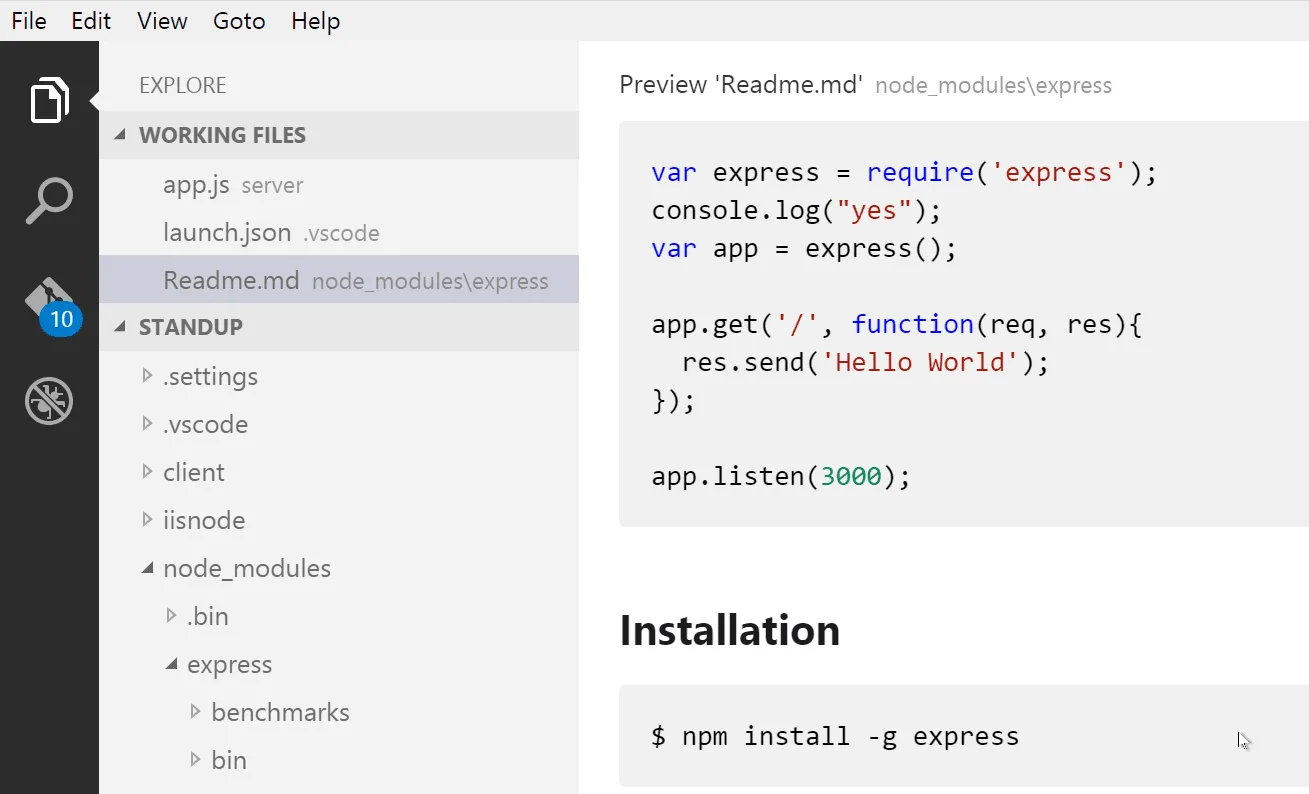
*Official documentation screenshot. Source: [Markdown editing in Visual Studio Code](https://code.visualstudio.com/docs/languages/markdown).*
VS Code treats Markdown as one language in a larger workspace. Its built-in support covers syntax highlighting, outline navigation, links, workspace references, rename operations, and side-by-side preview. Extensions add linting, Mermaid, richer previews, and inline or WYSIWYG-style editing.
That integration matters more than visual polish. A README often needs a Git diff, a search across the repository, a terminal command, or a link to source code. Developers can do all of that without changing context, and coding agents can work on the same files in the same workspace.
Its design priorities are also clear: editing the Markdown source comes first, while the rendered document lives in a secondary preview. That hierarchy makes sense for technical users who care about syntax, diffs, and repository context. For a nontechnical user who expects to open a file and see the document, it can feel backwards. The interface asks them to understand workspaces and panes before it becomes a comfortable reader.
Reddit users recommend VS Code for customization, Markdown dialects, templates, Mermaid, and linting. Their complaint is that its native choices remain source code or a separate read-only preview, which explains the continuing demand for inline-editor extensions. See the [Typora alternatives thread](https://www.reddit.com/r/Markdown/comments/1t4wvn8/which_markdown_editor_is_better_or_an_equal_to/) and [MEO extension discussion](https://www.reddit.com/r/vscode/comments/1ray1gp/meo_a_markdown_editor_for_vscode_with_livesource/).
**Pros**
- Markdown, code, Git, search, terminals, and coding agents share one workspace.
- Strong link navigation and refactoring across documentation sets.
- A mature extension ecosystem for linting and specialized Markdown syntax.
- Often already installed and open for the intended user.
**Cons**
- An IDE-sized interface is excessive for reading one file.
- Source editing has higher priority than preview, which makes the default workflow less approachable for nontechnical users.
- The rendered preview normally occupies another pane instead of becoming the primary document surface.
- Extension quality and overlapping behavior require judgment.
**Bottom line:** choose VS Code when you have a technical background or the Markdown belongs to a repository. We would not recommend it as a first Markdown app for a nontechnical user who mainly wants to read and lightly edit documents.
## Zettlr
**Our recommendation: the strongest open-source option for papers, books, and citation-heavy projects.**

*Official product screenshot. Source: [Zettlr](https://www.zettlr.com/).*
Zettlr is a GPL-licensed desktop app for macOS, Windows, and Linux. Its distinction is not merely that it edits Markdown. It brings local files, workspaces, citation management, Zotero integration, search, and Pandoc-based publishing into one research-oriented environment.
That makes it more demanding than Typora and more purposeful than a general notes app. A writer working across chapters, references, and output formats receives real value from the additional interface. Someone editing meeting notes probably does not.
User reports draw nearly the same line. One writer describes Typora as the focused drafting tool and Zettlr as the place for managing a large project assembled from many documents. Other users point to citations and Zotero—not backlinks—as the practical reason to choose it over Obsidian. See the [multi-editor workflow](https://www.reddit.com/r/Markdown/comments/1u5xhlu/i_dont_have_a_new_markdown_editor_to_present_to/) and [research-focused discussion](https://www.reddit.com/r/DigitalEscapeTools/comments/1u93dgo/zettlr_privacyfirst_markdown_editor_for_notes/).
**Pros**
- Open source, cross-platform, and based on local files.
- Citations, Zotero, workspaces, and Pandoc serve a complete publishing workflow.
- Better than minimalist editors at organizing large multi-file manuscripts.
**Cons**
- Denser interface and more concepts to learn.
- Source-oriented editing is less immediately visual than Typora.
- Research features are unnecessary overhead for ordinary notes and READMEs.
**Bottom line:** start with Zettlr when Markdown is the source format for a serious publication. Do not pick it merely because it is the open-source app with the most boxes checked.
## MarkText
**Our recommendation: the closest open-source alternative to Typora, with a maintenance caveat large enough to affect the decision.**
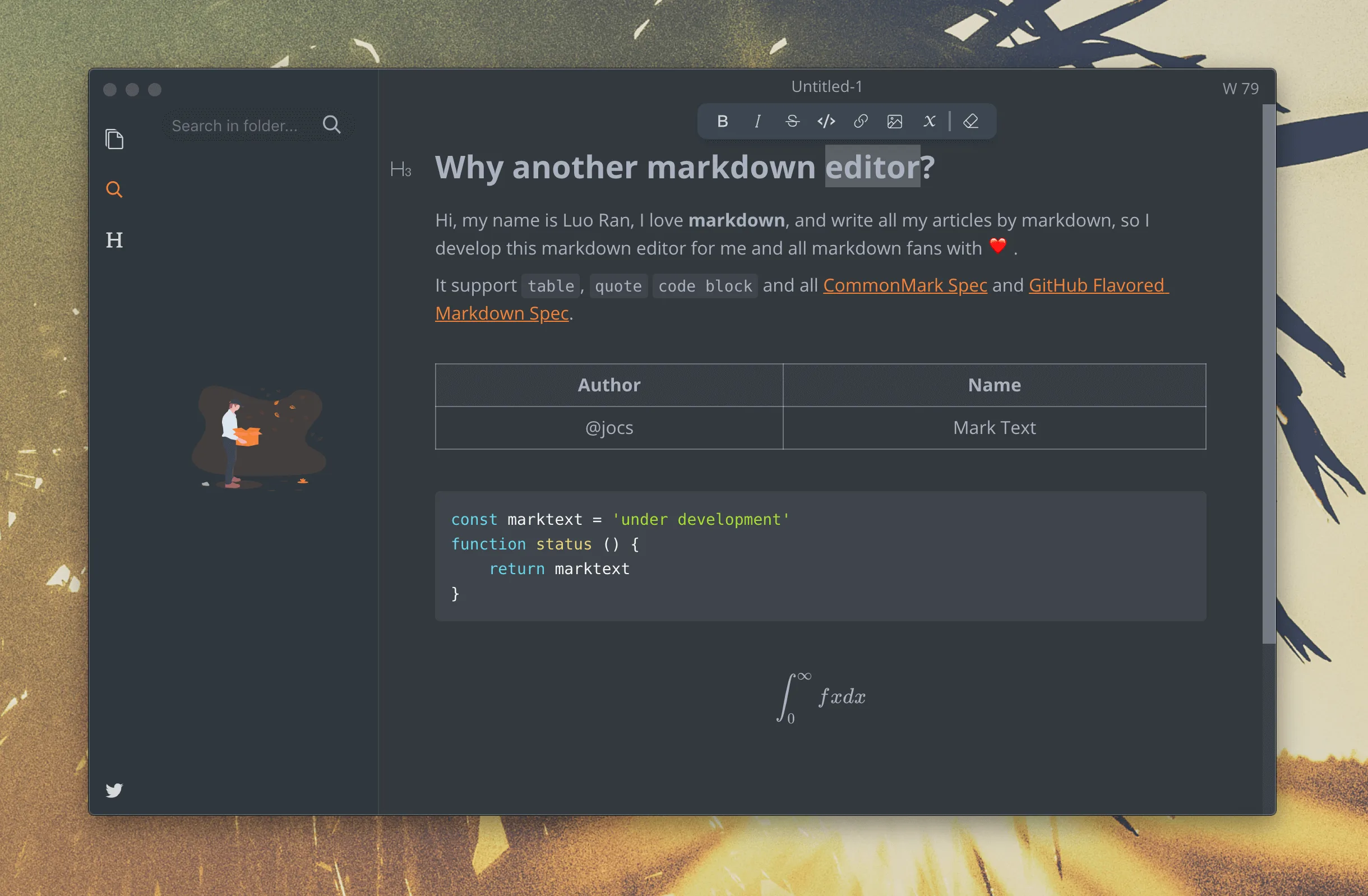
*Official project screenshot. Source: [MarkText on GitHub](https://github.com/marktext/marktext).*
MarkText is an MIT-licensed WYSIWYG editor for macOS, Windows, and Linux. It supports CommonMark and GitHub Flavored Markdown, tables, math, diagrams, focus mode, themes, a file tree, and several editing modes. In shape and intent, it is the clearest free alternative to Typora.
Its maintenance story needs more precision than “abandoned” or “back.” Development activity resumed in the source repository during 2026, but the latest stable binary shown on [GitHub Releases](https://github.com/marktext/marktext/releases) was still **0.17.1 from March 2022** when we checked. New commits are encouraging; ordinary users install releases, not commit activity.
:::note[Editor's field note]
The feature I value most in MarkText is less glamorous than WYSIWYG: it can open a directory and let me move through the files below it. The folder tree and document outline make it useful for a real writing project, not just one page. It feels like the open-source Typora alternative people describe it as. The old packaged release is why I would test it carefully before making it my only editor.
:::
Reddit feedback is sharply divided for the same reason. Some users call MarkText abandoned because the stable release is old. Others say that version still works perfectly well for individual files and prefer its rendering model. Both observations can be true: software may remain useful while its release process becomes a risk. See the [alternatives discussion](https://www.reddit.com/r/Markdown/comments/1t4wvn8/which_markdown_editor_is_better_or_an_equal_to/).
**Pros**
- Free, MIT-licensed, and genuinely open source.
- Familiar inline editing for people who like Typora's approach.
- A practical folder tree and document outline, plus tables, math, diagrams, and themes.
- Ordinary Markdown files remain portable.
**Cons**
- The stable installer is years behind current source work.
- Platform bugs and packaging issues may take longer to reach users as fixes.
- Less predictable support and release cadence than a maintained commercial product.
**Bottom line:** try MarkText before paying for Typora if open source matters. We would not yet call it fully revived; wait for source activity to become a stable release before giving it an unconditional recommendation.
## Joplin
**Our recommendation: the best fit here for an open-source notebook that must travel across devices.**
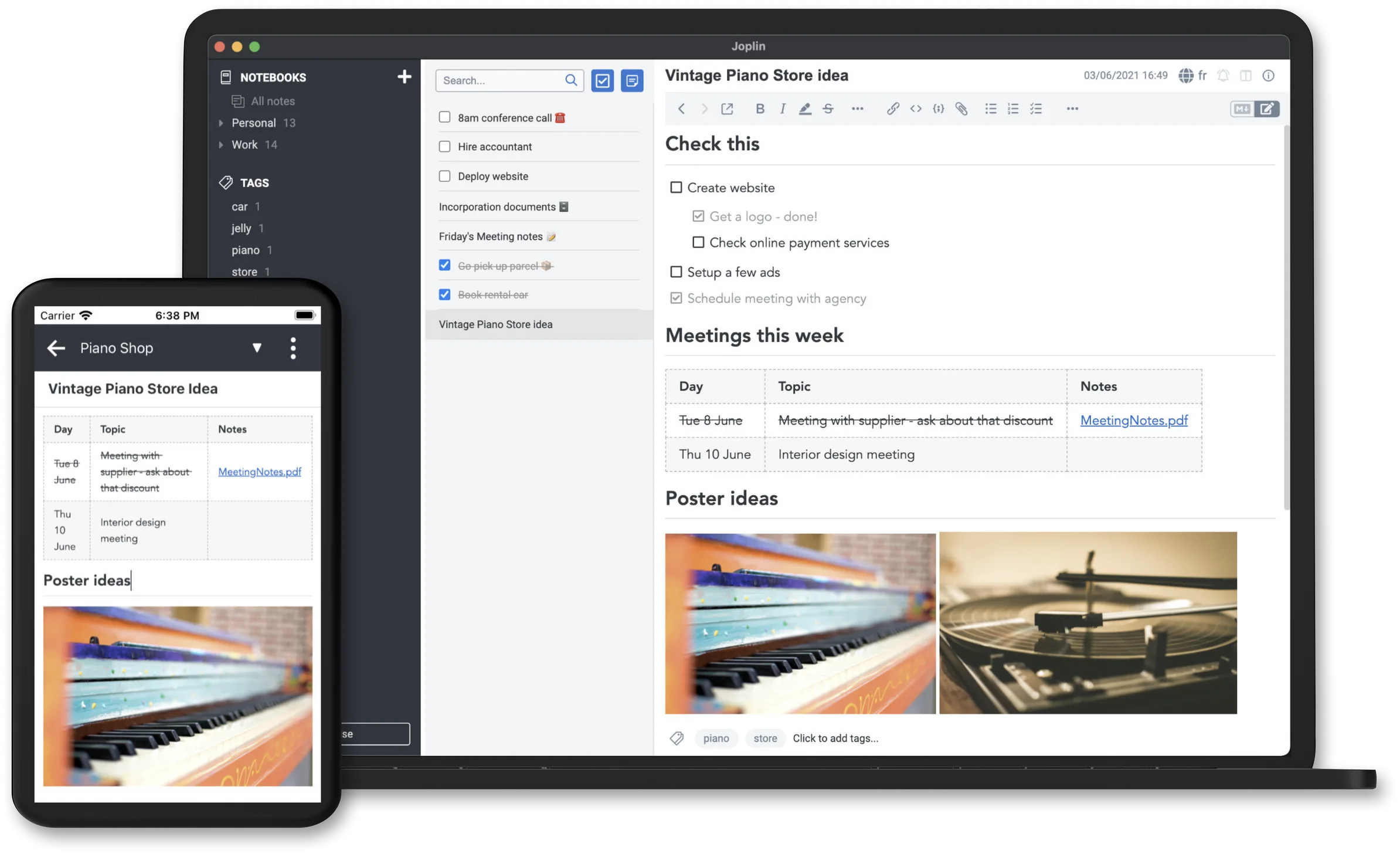
*Official product screenshot. Source: [Joplin](https://joplinapp.org/).*
Joplin is an open-source notes application with Markdown and rich-text editing, attachments, search, plugins, desktop and mobile clients, and end-to-end encrypted synchronization. Sync can use Joplin Cloud or supported third-party storage.
It belongs in this comparison because it uses Markdown, but it is not a neutral viewer for files scattered across a drive. Like Evernote, it manages notes inside an application. That distinction is easy to overlook until your workflow involves scripts, Git, or an AI agent writing directly to a path.
Joplin users say the rich-text editor is adequate for ordinary notes, while warning that some plugins do not work in that mode and unsupported Markdown can be altered during HTML-to-Markdown conversion. A detailed comparison with Obsidian praises Joplin's sync choices, OCR, tags, note history, and export while criticizing its interface polish and memory use. See [rich-text limitations](https://www.reddit.com/r/joplinapp/comments/1q5aj89/rich_text_editor_in_joplin_should_i_really_avoid/) and [Joplin versus Obsidian](https://www.reddit.com/r/joplinapp/comments/1k6l6fc/joplin_vs_obsidian_why_joplin_is_a_winner/).
**Pros**
- Open-source notebook system with capable desktop and mobile apps.
- Several sync choices, including an optional hosted service.
- Notes, attachments, tags, history, and search work without assembling a large plugin stack.
- Markdown export provides a route out.
**Cons**
- It manages application notes rather than arbitrary loose files.
- Rich-text editing can lose unsupported Markdown during conversion.
- Interface polish, startup time, and memory use receive mixed feedback.
**Bottom line:** choose Joplin when you want a private, open-source notebook on several devices. Do not choose it merely to double-click `.md` files.
## iA Writer
**Our recommendation: a premium focus tool for prose, especially if the iPhone and iPad are part of the workflow.**
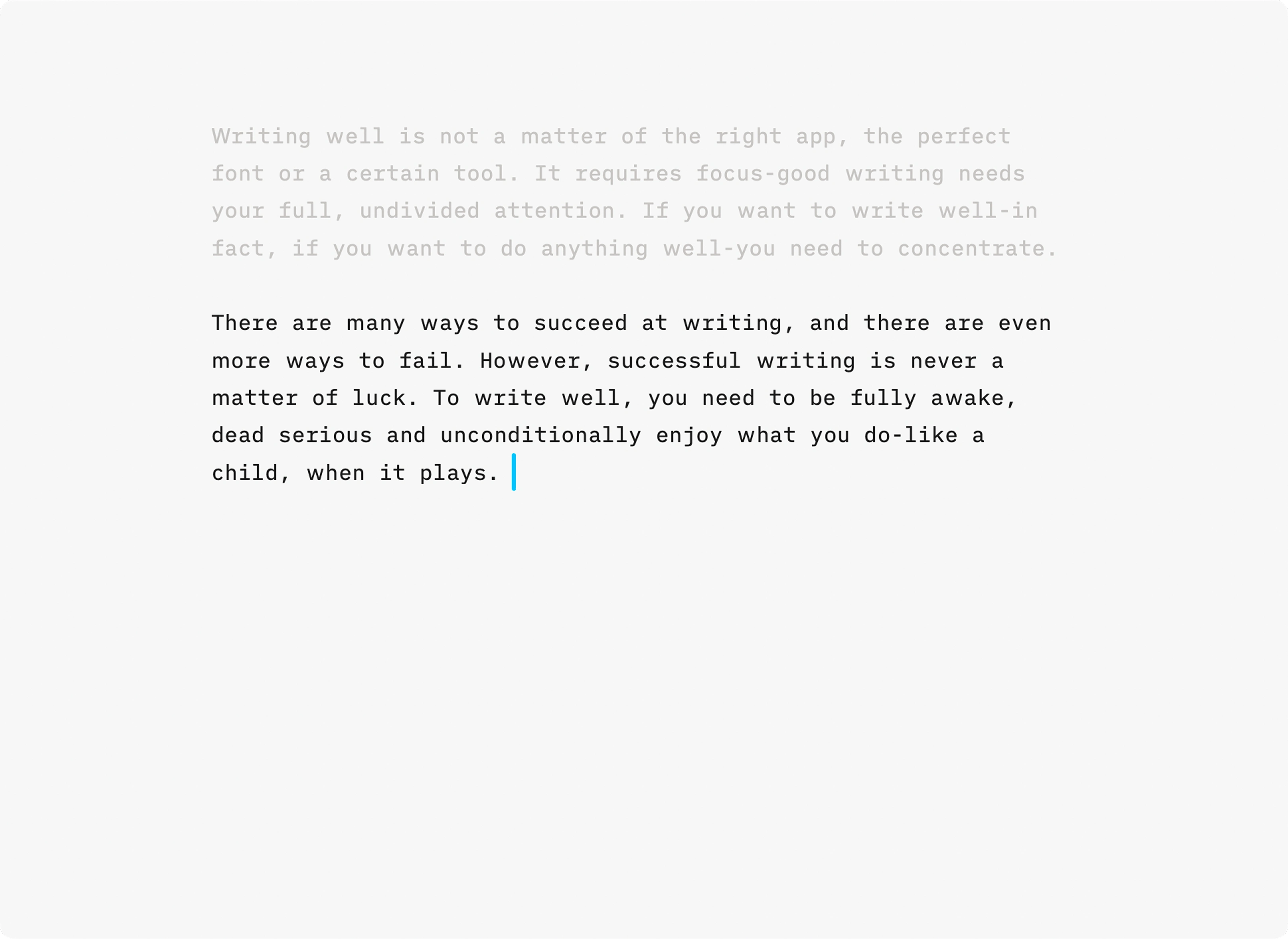
*Official product screenshot. Source: [iA Writer](https://ia.net/writer).*
iA Writer separates plain-text composition from styled preview. Its recognizable features include Focus Mode, syntax highlighting for parts of speech, templates, and PDF or Word export. The design is disciplined: fewer knobs than Obsidian, fewer developer affordances than VS Code, and more attention to the sentence being written.
That discipline is not cheap across platforms. Current one-time prices are **$49.99 for Mac**, **$29.99 for Windows**, and **$49.99 for iPhone and iPad**, with a seven-day desktop trial. Purchases are separate, and major upgrades may cost extra. See [official pricing](https://ia.net/writer/pricing).
In Reddit recommendations, users choose iA Writer when Typora's lack of an iPad app is decisive or when Obsidian's configuration options become distracting. The trade-off is a narrower tool and more work when a document must return to a Word-centric workflow. See the [writer recommendations](https://www.reddit.com/r/Markdown/comments/1tn6yhu/editor_recommend_for_writer/).
**Pros**
- Excellent typography and a genuinely focused interface.
- Strong native experience on Mac, iPhone, and iPad; Windows is also supported.
- Useful prose tools without turning writing into plugin management.
- One-time purchases rather than a required subscription.
**Cons**
- Separate platform purchases make a multi-device setup expensive.
- Less extensible than Obsidian or VS Code.
- Source and preview remain separate, unlike Typora's inline model.
**Bottom line:** iA Writer is a considered purchase for prose and mobile focus. It is poor value if your main output is READMEs, agent plans, or technical notes written at a desk.
## ColaMD
**Our recommendation: a promising specialist for AI-edited local files, not yet the general winner.**
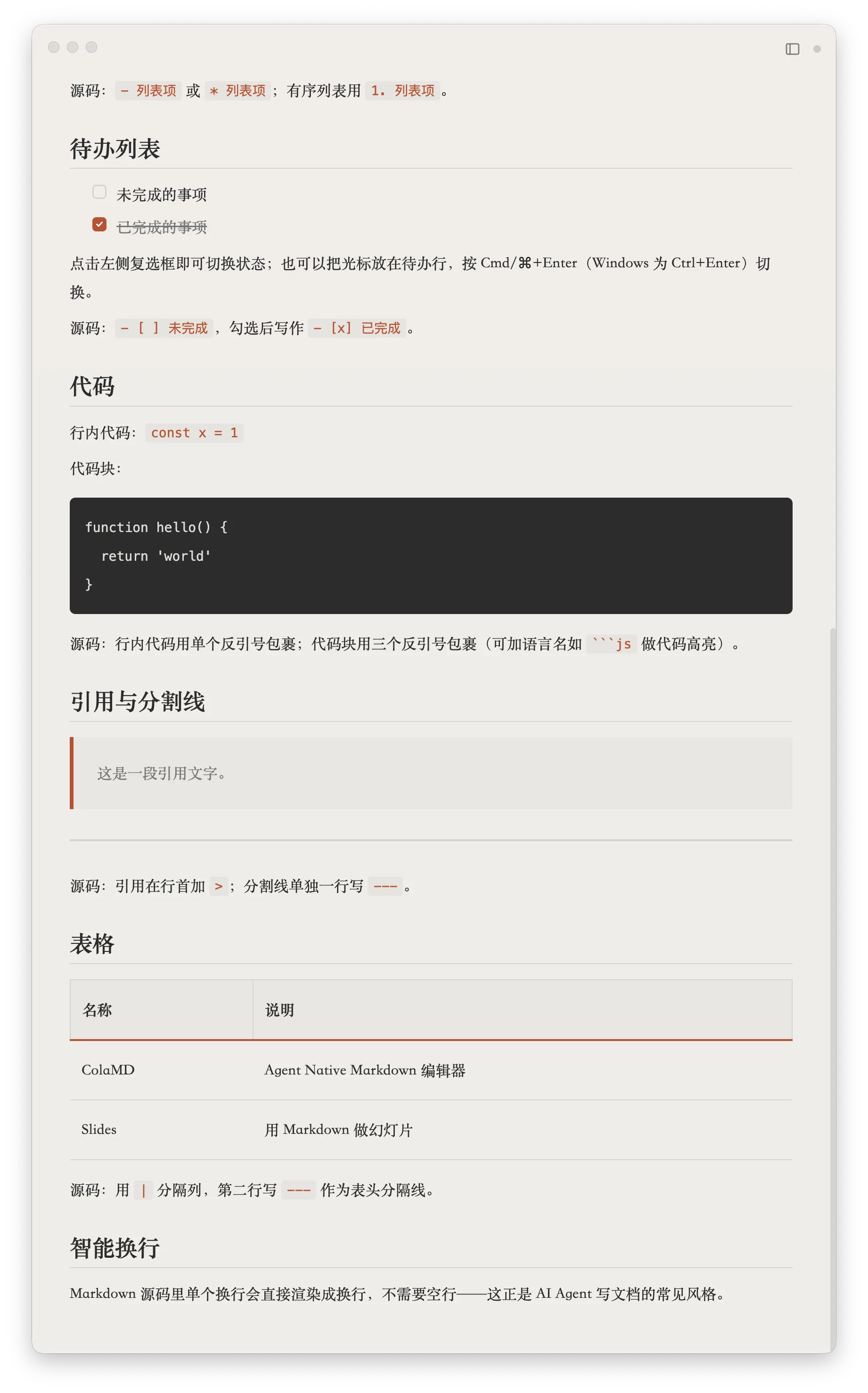
*Official project screenshot. Source: [ColaMD on GitHub](https://github.com/marswaveai/ColaMD).*
ColaMD is a young, MIT-licensed WYSIWYG editor for macOS, Windows, and Linux. Its pitch is unusually specific: keep a local Markdown file readable while Claude Code, Codex, Cursor, or another external process keeps changing it. It also supports task lists, KaTeX, themes, rich-text copy, search, and PDF export. The [official README](https://github.com/marswaveai/ColaMD#features) is refreshingly explicit about what it does not try to provide: cloud sync, collaboration, plugins, a built-in AI assistant, or a cross-directory workspace.
Live refresh is useful, but it is not unique. Developer editors and knowledge tools already respond to external file changes in various ways. ColaMD's distinction is that this interaction is central to the product instead of one behavior inside a much larger system. Whether that is enough depends on how much you value WYSIWYG reading while an agent works elsewhere.
Size also deserves an accurate description. For the current [**v1.8.2** release](https://github.com/marswaveai/ColaMD/releases/tag/v1.8.2), official downloadable files range from roughly **84 MB to 111 MB**, depending on platform and format. On the machine used for this review, the installed application occupied more than **900 MB**. We have not traced that expansion to a specific component, so it should be treated as a local observation rather than a universal installation size.
:::note[Editor's field note]
ColaMD has a clear visual point of view, although its icons and default typeface are not to my taste. More importantly, I could not find a document outline or table-of-contents panel—the kind of navigation I rely on in longer files. Live updating works, but because I already expect that behavior in tools such as Codex, Obsidian, and developer editors, it does not by itself outweigh the missing navigation for me.
:::
We also could not find a document outline or TOC feature in the v1.8.2 feature list or source tree. That is not important for a short generated plan; it matters quickly in a long report. The project is young enough that both the omission and our conclusion may change.
Reddit provides stronger evidence for the **problem** than for ColaMD itself. Users repeatedly ask for a lightweight way to open one Markdown file without starting an IDE or placing it in an Obsidian vault. External-change reload also appears as a desired feature in editor discussions. What we did not find was a large body of independent, long-term ColaMD experience. See the [Typora alternatives discussion](https://www.reddit.com/r/Markdown/comments/1t4wvn8/which_markdown_editor_is_better_or_an_equal_to/) and [standalone-file Obsidian discussion](https://www.reddit.com/r/ObsidianMD/comments/1uiyv7x/using_obsidian_as_a_standalone_markdown/).
**Pros**
- Opens ordinary local files and keeps the AI in the terminal or coding tool you already use.
- External-change refresh is central to the experience.
- True WYSIWYG view, cross-platform builds, no account, and an MIT license.
- A deliberately small conceptual surface.
**Cons**
- No cloud sync, collaboration, plugins, or cross-directory workspace tree.
- No document outline or TOC feature we could identify in v1.8.2.
- The installed footprint on our test machine was large relative to the app's focused job.
- Too new to have the independent usage history of Typora, Obsidian, or VS Code.
**Bottom line:** shortlist ColaMD when you regularly watch an external agent revise a local Markdown file and want a cleaner reading surface than an IDE. For general document writing, Typora is more complete. For folders, repositories, and knowledge bases, choose a tool designed around those larger units.
## Which Markdown editor should you choose?
If the answer still feels ambiguous, follow the file rather than the feature list.
1. **You open isolated documents:** choose Typora. Try MarkText first if open source is a requirement. Test ColaMD if external-agent updates are the reason you are looking.
2. **You maintain a connected collection of notes:** choose Obsidian for extensibility or Joplin for an open-source notebook with flexible synchronization.
3. **You write Markdown beside code:** stay in VS Code unless a dedicated editor solves a specific irritation.
4. **You write a paper, thesis, or book with citations:** choose Zettlr.
5. **You write prose on Mac, iPhone, and iPad:** consider iA Writer if its focused design is worth the per-platform cost.
6. **You require the application itself to be open source:** shortlist MarkText, Zettlr, Joplin, and ColaMD. Free Obsidian and Microsoft's VS Code build do not meet that test.
For AI workflows, test one additional thing before committing: have your actual agent repeatedly rewrite a long file. Watch whether the editor reloads automatically, preserves the reading position, handles atomic saves, and warns about conflicting human edits. Those behaviors matter more than an “AI-powered” label.
## How we evaluated these tools
This is an editorial comparison, not a synthetic benchmark. We considered:
- official product descriptions, licenses, platforms, prices, and release status;
- whether content remains in ordinary Markdown files;
- source, split-preview, inline-preview, and rich-text editing models;
- fit for individual files, folders, notebooks, repositories, and external agents;
- our editor's direct experience where explicitly identified;
- recent Reddit reports describing a concrete benefit, failure mode, or reason for switching.
We did not assign numerical scores, measure performance across identical hardware, or treat a popular Reddit comment as a representative survey. A screenshot proves what an interface looks like, not that it works well. A source commit proves activity, not that a stable installer is ready. Prices and features change, so check the linked official page before purchasing.
## Frequently asked questions
### What is the best Markdown editor overall?
Typora is the best general document editor in this comparison. Obsidian is better for a linked knowledge base, VS Code for repository documentation, and Zettlr for academic writing. There is no honest overall winner without naming the workflow.
### What is the best free and open-source Markdown editor?
MarkText is the closest open-source alternative to Typora, but its stable release is old. Zettlr is the stronger choice for research and large writing projects, Joplin for a cross-device notebook, and ColaMD for local files changed by external agents.
### Is Typora free?
No. Typora moved to paid licensing with version 1.0 on November 23, 2021. It currently offers a 15-day evaluation and costs $14.99 before tax for a license covering up to three devices.
### Is Obsidian a Markdown editor?
Yes, but it is better understood as a knowledge-base application whose storage format is Markdown. Its vault, links, plugins, and graph are advantages for connected notes and overhead for a one-off loose file.
### Which Markdown editor works best with AI coding agents?
VS Code fits agents already working inside a code repository. ColaMD is designed as a WYSIWYG surface for ordinary local files changed by an external agent. Obsidian also works with local files inside a vault. Test reload, scroll preservation, atomic saves, and edit conflicts with your actual agent before choosing.
### Are Markdown editors safe for private files?
Local storage reduces some exposure but is not a complete security guarantee. Check telemetry, plugins, synchronization services, update channels, and whether AI features send content to a model provider. Open source improves inspectability; it does not guarantee secure defaults.
ColaMD | Free, MIT | macOS, Windows, Linux | Local files changed by external AI agents | Young project; no workspace tree, plugins, or visible document outline |
:::caution[Free does not mean open source]
Obsidian is free to use and stores local Markdown files, but the application is proprietary. Microsoft's VS Code download also uses Microsoft's product license, although the upstream Code - OSS repository is MIT-licensed. If auditability or redistribution matters, check the application license rather than its price.
:::
## Typora
**Our recommendation: the best paid Markdown editor for people who want a document, not a system.**

*Official product screenshot. Source: [Typora](https://typora.io/).*
Typora's enduring advantage is not a rare feature. It is that the editor feels unusually coherent. Instead of keeping Markdown source on the left and a rendered preview on the right, it formats the document in place. Tables, math, diagrams, file navigation, an outline, custom CSS themes, focus mode, and export are present without making the page feel like a control panel.
Typora became a paid product with the [1.0 release on November 23, 2021](https://support.typora.io/What%27s-New-1.0/). That was almost five years ago at the time of this review, so describing the change as recent is no longer accurate. The official price is currently **$14.99 before tax**, covering up to three devices, with a 15-day evaluation period.
:::note[Editor's field note]
Typora was my regular Markdown editor for years, largely because its typography and editing rhythm were better than the alternatives. When an evaluation expires it asks for a license, but in my experience the prompt has not prevented me from viewing a document. I still think it is worth paying for if that polish matters to you; the price is modest for software used every day.
:::
Reddit discussions still treat Typora as the benchmark to match. Users repeatedly return to its writing feel, inline rendering, and PDF export. The recurring criticism is equally specific: Markdown syntax reappears around the cursor and can move the text slightly while editing, so this is not identical to a Word-style rich-text editor. Others leave because they need tabs, mobile access, extensibility, or a knowledge base. See the [Typora alternatives discussion](https://www.reddit.com/r/Markdown/comments/1t4wvn8/which_markdown_editor_is_better_or_an_equal_to/) and [WYSIWYG discussion](https://www.reddit.com/r/Markdown/comments/1v0qd3b/so_there_is_no_true_wysiwyg_markdown_editor_they/).
**Pros**
- The most refined inline Markdown editing in this group.
- Opens ordinary files and folders without converting them into a library.
- Strong tables, math, diagrams, outline navigation, themes, and export.
- A low one-time price rather than another subscription.
**Cons**
- Proprietary and paid.
- No mobile version, backlink system, or plugin ecosystem comparable to Obsidian.
- Inline syntax still appears at the cursor, which some writers find visually disruptive.
**Bottom line:** buy Typora if most of your work begins with “open this document and write.” It is our safest general recommendation, but not the right architecture for a second brain or a code repository.
## Obsidian
**Our recommendation: the best Markdown knowledge system, but an unnecessarily heavy way to open one file.**

*Official screenshot of the Obsidian ecosystem. Source: [Obsidian](https://obsidian.md/).*
Obsidian is one of the most established products in this comparison's knowledge-base category. It stores notes locally as Markdown, then builds backlinks, graph views, Canvas, properties, search, themes, and a large plugin ecosystem around them. The core app is free and works on desktop and mobile; Sync and Publish are optional paid services.
The crucial word is **vault**. An Obsidian vault is simply a folder of notes, which is much more portable than a proprietary cloud database. But it is still the unit around which the product is designed. That is an advantage when the folder represents an evolving body of knowledge and a minor obstacle when somebody sends you one Markdown file in Downloads.
:::note[Editor's field note]
Obsidian is powerful, mature, and unusually extensible. I like it when I am working inside a vault. But sometimes I only want to open a `.md` file, read it, and close it. In that moment the vault concept makes an otherwise excellent app feel heavier than the job.
:::
The same tension appears in user reports. An r/ObsidianMD discussion praises Obsidian as an editor and viewer while objecting to moving a standalone file into a vault. Writers also describe the plugin system as both its strength and a source of distraction: the app can become a hobby to configure rather than a place to write. See the [standalone-file discussion](https://www.reddit.com/r/ObsidianMD/comments/1uiyv7x/using_obsidian_as_a_standalone_markdown/) and [writer recommendations](https://www.reddit.com/r/Markdown/comments/1tn6yhu/editor_recommend_for_writer/).
**Pros**
- Excellent links, search, graph, themes, and community plugins.
- Local Markdown files make the content more portable than a closed notebook database.
- Serious desktop and mobile applications.
- Can grow from plain notes into a highly customized research or knowledge environment.
**Cons**
- The vault model adds friction to isolated files.
- Plugins and themes invite endless configuration and occasional compatibility problems.
- The application is proprietary; official synchronization and publishing cost extra.
**Bottom line:** choose Obsidian when the folder matters more than the individual file. If you regularly follow links between notes and expect the collection to live for years, its extra structure earns its keep. For a generated `plan.md` you may read once, it does not.
## Visual Studio Code
**Our recommendation: the default for technical users working on Markdown inside a software project.**

*Official documentation screenshot. Source: [Markdown editing in Visual Studio Code](https://code.visualstudio.com/docs/languages/markdown).*
VS Code treats Markdown as one language in a larger workspace. Its built-in support covers syntax highlighting, outline navigation, links, workspace references, rename operations, and side-by-side preview. Extensions add linting, Mermaid, richer previews, and inline or WYSIWYG-style editing.
That integration matters more than visual polish. A README often needs a Git diff, a search across the repository, a terminal command, or a link to source code. Developers can do all of that without changing context, and coding agents can work on the same files in the same workspace.
Its design priorities are also clear: editing the Markdown source comes first, while the rendered document lives in a secondary preview. That hierarchy makes sense for technical users who care about syntax, diffs, and repository context. For a nontechnical user who expects to open a file and see the document, it can feel backwards. The interface asks them to understand workspaces and panes before it becomes a comfortable reader.
Reddit users recommend VS Code for customization, Markdown dialects, templates, Mermaid, and linting. Their complaint is that its native choices remain source code or a separate read-only preview, which explains the continuing demand for inline-editor extensions. See the [Typora alternatives thread](https://www.reddit.com/r/Markdown/comments/1t4wvn8/which_markdown_editor_is_better_or_an_equal_to/) and [MEO extension discussion](https://www.reddit.com/r/vscode/comments/1ray1gp/meo_a_markdown_editor_for_vscode_with_livesource/).
**Pros**
- Markdown, code, Git, search, terminals, and coding agents share one workspace.
- Strong link navigation and refactoring across documentation sets.
- A mature extension ecosystem for linting and specialized Markdown syntax.
- Often already installed and open for the intended user.
**Cons**
- An IDE-sized interface is excessive for reading one file.
- Source editing has higher priority than preview, which makes the default workflow less approachable for nontechnical users.
- The rendered preview normally occupies another pane instead of becoming the primary document surface.
- Extension quality and overlapping behavior require judgment.
**Bottom line:** choose VS Code when you have a technical background or the Markdown belongs to a repository. We would not recommend it as a first Markdown app for a nontechnical user who mainly wants to read and lightly edit documents.
## Zettlr
**Our recommendation: the strongest open-source option for papers, books, and citation-heavy projects.**

*Official product screenshot. Source: [Zettlr](https://www.zettlr.com/).*
Zettlr is a GPL-licensed desktop app for macOS, Windows, and Linux. Its distinction is not merely that it edits Markdown. It brings local files, workspaces, citation management, Zotero integration, search, and Pandoc-based publishing into one research-oriented environment.
That makes it more demanding than Typora and more purposeful than a general notes app. A writer working across chapters, references, and output formats receives real value from the additional interface. Someone editing meeting notes probably does not.
User reports draw nearly the same line. One writer describes Typora as the focused drafting tool and Zettlr as the place for managing a large project assembled from many documents. Other users point to citations and Zotero—not backlinks—as the practical reason to choose it over Obsidian. See the [multi-editor workflow](https://www.reddit.com/r/Markdown/comments/1u5xhlu/i_dont_have_a_new_markdown_editor_to_present_to/) and [research-focused discussion](https://www.reddit.com/r/DigitalEscapeTools/comments/1u93dgo/zettlr_privacyfirst_markdown_editor_for_notes/).
**Pros**
- Open source, cross-platform, and based on local files.
- Citations, Zotero, workspaces, and Pandoc serve a complete publishing workflow.
- Better than minimalist editors at organizing large multi-file manuscripts.
**Cons**
- Denser interface and more concepts to learn.
- Source-oriented editing is less immediately visual than Typora.
- Research features are unnecessary overhead for ordinary notes and READMEs.
**Bottom line:** start with Zettlr when Markdown is the source format for a serious publication. Do not pick it merely because it is the open-source app with the most boxes checked.
## MarkText
**Our recommendation: the closest open-source alternative to Typora, with a maintenance caveat large enough to affect the decision.**

*Official project screenshot. Source: [MarkText on GitHub](https://github.com/marktext/marktext).*
MarkText is an MIT-licensed WYSIWYG editor for macOS, Windows, and Linux. It supports CommonMark and GitHub Flavored Markdown, tables, math, diagrams, focus mode, themes, a file tree, and several editing modes. In shape and intent, it is the clearest free alternative to Typora.
Its maintenance story needs more precision than “abandoned” or “back.” Development activity resumed in the source repository during 2026, but the latest stable binary shown on [GitHub Releases](https://github.com/marktext/marktext/releases) was still **0.17.1 from March 2022** when we checked. New commits are encouraging; ordinary users install releases, not commit activity.
:::note[Editor's field note]
The feature I value most in MarkText is less glamorous than WYSIWYG: it can open a directory and let me move through the files below it. The folder tree and document outline make it useful for a real writing project, not just one page. It feels like the open-source Typora alternative people describe it as. The old packaged release is why I would test it carefully before making it my only editor.
:::
Reddit feedback is sharply divided for the same reason. Some users call MarkText abandoned because the stable release is old. Others say that version still works perfectly well for individual files and prefer its rendering model. Both observations can be true: software may remain useful while its release process becomes a risk. See the [alternatives discussion](https://www.reddit.com/r/Markdown/comments/1t4wvn8/which_markdown_editor_is_better_or_an_equal_to/).
**Pros**
- Free, MIT-licensed, and genuinely open source.
- Familiar inline editing for people who like Typora's approach.
- A practical folder tree and document outline, plus tables, math, diagrams, and themes.
- Ordinary Markdown files remain portable.
**Cons**
- The stable installer is years behind current source work.
- Platform bugs and packaging issues may take longer to reach users as fixes.
- Less predictable support and release cadence than a maintained commercial product.
**Bottom line:** try MarkText before paying for Typora if open source matters. We would not yet call it fully revived; wait for source activity to become a stable release before giving it an unconditional recommendation.
## Joplin
**Our recommendation: the best fit here for an open-source notebook that must travel across devices.**

*Official product screenshot. Source: [Joplin](https://joplinapp.org/).*
Joplin is an open-source notes application with Markdown and rich-text editing, attachments, search, plugins, desktop and mobile clients, and end-to-end encrypted synchronization. Sync can use Joplin Cloud or supported third-party storage.
It belongs in this comparison because it uses Markdown, but it is not a neutral viewer for files scattered across a drive. Like Evernote, it manages notes inside an application. That distinction is easy to overlook until your workflow involves scripts, Git, or an AI agent writing directly to a path.
Joplin users say the rich-text editor is adequate for ordinary notes, while warning that some plugins do not work in that mode and unsupported Markdown can be altered during HTML-to-Markdown conversion. A detailed comparison with Obsidian praises Joplin's sync choices, OCR, tags, note history, and export while criticizing its interface polish and memory use. See [rich-text limitations](https://www.reddit.com/r/joplinapp/comments/1q5aj89/rich_text_editor_in_joplin_should_i_really_avoid/) and [Joplin versus Obsidian](https://www.reddit.com/r/joplinapp/comments/1k6l6fc/joplin_vs_obsidian_why_joplin_is_a_winner/).
**Pros**
- Open-source notebook system with capable desktop and mobile apps.
- Several sync choices, including an optional hosted service.
- Notes, attachments, tags, history, and search work without assembling a large plugin stack.
- Markdown export provides a route out.
**Cons**
- It manages application notes rather than arbitrary loose files.
- Rich-text editing can lose unsupported Markdown during conversion.
- Interface polish, startup time, and memory use receive mixed feedback.
**Bottom line:** choose Joplin when you want a private, open-source notebook on several devices. Do not choose it merely to double-click `.md` files.
## iA Writer
**Our recommendation: a premium focus tool for prose, especially if the iPhone and iPad are part of the workflow.**

*Official product screenshot. Source: [iA Writer](https://ia.net/writer).*
iA Writer separates plain-text composition from styled preview. Its recognizable features include Focus Mode, syntax highlighting for parts of speech, templates, and PDF or Word export. The design is disciplined: fewer knobs than Obsidian, fewer developer affordances than VS Code, and more attention to the sentence being written.
That discipline is not cheap across platforms. Current one-time prices are **$49.99 for Mac**, **$29.99 for Windows**, and **$49.99 for iPhone and iPad**, with a seven-day desktop trial. Purchases are separate, and major upgrades may cost extra. See [official pricing](https://ia.net/writer/pricing).
In Reddit recommendations, users choose iA Writer when Typora's lack of an iPad app is decisive or when Obsidian's configuration options become distracting. The trade-off is a narrower tool and more work when a document must return to a Word-centric workflow. See the [writer recommendations](https://www.reddit.com/r/Markdown/comments/1tn6yhu/editor_recommend_for_writer/).
**Pros**
- Excellent typography and a genuinely focused interface.
- Strong native experience on Mac, iPhone, and iPad; Windows is also supported.
- Useful prose tools without turning writing into plugin management.
- One-time purchases rather than a required subscription.
**Cons**
- Separate platform purchases make a multi-device setup expensive.
- Less extensible than Obsidian or VS Code.
- Source and preview remain separate, unlike Typora's inline model.
**Bottom line:** iA Writer is a considered purchase for prose and mobile focus. It is poor value if your main output is READMEs, agent plans, or technical notes written at a desk.
## ColaMD
**Our recommendation: a promising specialist for AI-edited local files, not yet the general winner.**

*Official project screenshot. Source: [ColaMD on GitHub](https://github.com/marswaveai/ColaMD).*
ColaMD is a young, MIT-licensed WYSIWYG editor for macOS, Windows, and Linux. Its pitch is unusually specific: keep a local Markdown file readable while Claude Code, Codex, Cursor, or another external process keeps changing it. It also supports task lists, KaTeX, themes, rich-text copy, search, and PDF export. The [official README](https://github.com/marswaveai/ColaMD#features) is refreshingly explicit about what it does not try to provide: cloud sync, collaboration, plugins, a built-in AI assistant, or a cross-directory workspace.
Live refresh is useful, but it is not unique. Developer editors and knowledge tools already respond to external file changes in various ways. ColaMD's distinction is that this interaction is central to the product instead of one behavior inside a much larger system. Whether that is enough depends on how much you value WYSIWYG reading while an agent works elsewhere.
Size also deserves an accurate description. For the current [**v1.8.2** release](https://github.com/marswaveai/ColaMD/releases/tag/v1.8.2), official downloadable files range from roughly **84 MB to 111 MB**, depending on platform and format. On the machine used for this review, the installed application occupied more than **900 MB**. We have not traced that expansion to a specific component, so it should be treated as a local observation rather than a universal installation size.
:::note[Editor's field note]
ColaMD has a clear visual point of view, although its icons and default typeface are not to my taste. More importantly, I could not find a document outline or table-of-contents panel—the kind of navigation I rely on in longer files. Live updating works, but because I already expect that behavior in tools such as Codex, Obsidian, and developer editors, it does not by itself outweigh the missing navigation for me.
:::
We also could not find a document outline or TOC feature in the v1.8.2 feature list or source tree. That is not important for a short generated plan; it matters quickly in a long report. The project is young enough that both the omission and our conclusion may change.
Reddit provides stronger evidence for the **problem** than for ColaMD itself. Users repeatedly ask for a lightweight way to open one Markdown file without starting an IDE or placing it in an Obsidian vault. External-change reload also appears as a desired feature in editor discussions. What we did not find was a large body of independent, long-term ColaMD experience. See the [Typora alternatives discussion](https://www.reddit.com/r/Markdown/comments/1t4wvn8/which_markdown_editor_is_better_or_an_equal_to/) and [standalone-file Obsidian discussion](https://www.reddit.com/r/ObsidianMD/comments/1uiyv7x/using_obsidian_as_a_standalone_markdown/).
**Pros**
- Opens ordinary local files and keeps the AI in the terminal or coding tool you already use.
- External-change refresh is central to the experience.
- True WYSIWYG view, cross-platform builds, no account, and an MIT license.
- A deliberately small conceptual surface.
**Cons**
- No cloud sync, collaboration, plugins, or cross-directory workspace tree.
- No document outline or TOC feature we could identify in v1.8.2.
- The installed footprint on our test machine was large relative to the app's focused job.
- Too new to have the independent usage history of Typora, Obsidian, or VS Code.
**Bottom line:** shortlist ColaMD when you regularly watch an external agent revise a local Markdown file and want a cleaner reading surface than an IDE. For general document writing, Typora is more complete. For folders, repositories, and knowledge bases, choose a tool designed around those larger units.
## Which Markdown editor should you choose?
If the answer still feels ambiguous, follow the file rather than the feature list.
1. **You open isolated documents:** choose Typora. Try MarkText first if open source is a requirement. Test ColaMD if external-agent updates are the reason you are looking.
2. **You maintain a connected collection of notes:** choose Obsidian for extensibility or Joplin for an open-source notebook with flexible synchronization.
3. **You write Markdown beside code:** stay in VS Code unless a dedicated editor solves a specific irritation.
4. **You write a paper, thesis, or book with citations:** choose Zettlr.
5. **You write prose on Mac, iPhone, and iPad:** consider iA Writer if its focused design is worth the per-platform cost.
6. **You require the application itself to be open source:** shortlist MarkText, Zettlr, Joplin, and ColaMD. Free Obsidian and Microsoft's VS Code build do not meet that test.
For AI workflows, test one additional thing before committing: have your actual agent repeatedly rewrite a long file. Watch whether the editor reloads automatically, preserves the reading position, handles atomic saves, and warns about conflicting human edits. Those behaviors matter more than an “AI-powered” label.
## How we evaluated these tools
This is an editorial comparison, not a synthetic benchmark. We considered:
- official product descriptions, licenses, platforms, prices, and release status;
- whether content remains in ordinary Markdown files;
- source, split-preview, inline-preview, and rich-text editing models;
- fit for individual files, folders, notebooks, repositories, and external agents;
- our editor's direct experience where explicitly identified;
- recent Reddit reports describing a concrete benefit, failure mode, or reason for switching.
We did not assign numerical scores, measure performance across identical hardware, or treat a popular Reddit comment as a representative survey. A screenshot proves what an interface looks like, not that it works well. A source commit proves activity, not that a stable installer is ready. Prices and features change, so check the linked official page before purchasing.
## Frequently asked questions
### What is the best Markdown editor overall?
Typora is the best general document editor in this comparison. Obsidian is better for a linked knowledge base, VS Code for repository documentation, and Zettlr for academic writing. There is no honest overall winner without naming the workflow.
### What is the best free and open-source Markdown editor?
MarkText is the closest open-source alternative to Typora, but its stable release is old. Zettlr is the stronger choice for research and large writing projects, Joplin for a cross-device notebook, and ColaMD for local files changed by external agents.
### Is Typora free?
No. Typora moved to paid licensing with version 1.0 on November 23, 2021. It currently offers a 15-day evaluation and costs $14.99 before tax for a license covering up to three devices.
### Is Obsidian a Markdown editor?
Yes, but it is better understood as a knowledge-base application whose storage format is Markdown. Its vault, links, plugins, and graph are advantages for connected notes and overhead for a one-off loose file.
### Which Markdown editor works best with AI coding agents?
VS Code fits agents already working inside a code repository. ColaMD is designed as a WYSIWYG surface for ordinary local files changed by an external agent. Obsidian also works with local files inside a vault. Test reload, scroll preservation, atomic saves, and edit conflicts with your actual agent before choosing.
### Are Markdown editors safe for private files?
Local storage reduces some exposure but is not a complete security guarantee. Check telemetry, plugins, synchronization services, update channels, and whether AI features send content to a model provider. Open source improves inspectability; it does not guarantee secure defaults.